
Notes and attachments
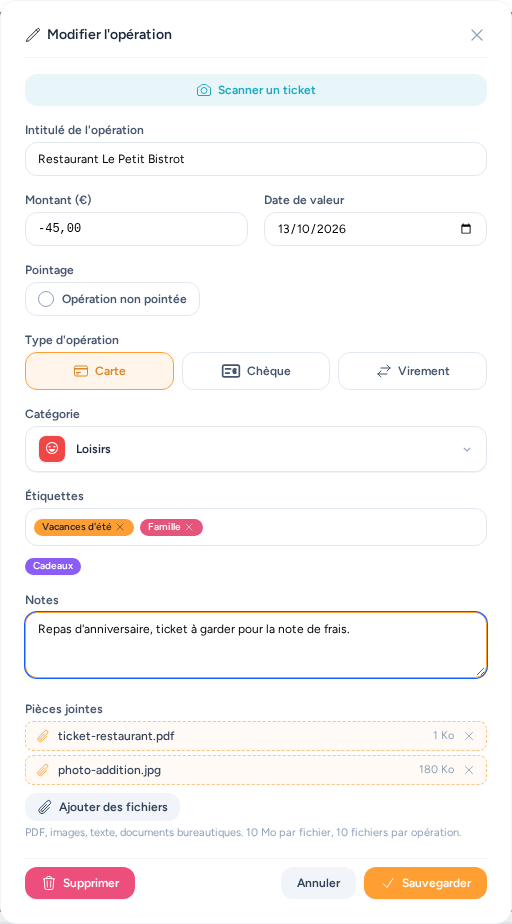
An operation can carry a free note and attachments: an invoice, a receipt, a warranty slip, a quote… Everything is set in the operation form, below the tags.
To fill in the operation from a photo of a receipt, see Scanning a receipt.
Notes
The Notes field accepts up to 5,000 characters. It is separate from the bank description shown in grey under the name, which comes from the import and cannot be edited. The search on an account page also covers notes: typing "warranty" finds every operation whose note contains that word.
In the list, a small document icon marks an operation that has a note; the tooltip shows its text.
Attachments
The Add files button opens your device's file picker (several files at once). The chosen files appear with a dashed outline and are only uploaded when you save the operation; the cross removes a file before it is sent.
| Accepted formats | PDF, images (JPG, PNG, GIF, WebP, HEIC), text and CSV, Word, Excel and OpenDocument documents |
| Maximum size | 10 MB per file |
| Maximum count | 10 files per operation |
When editing an operation, the files already saved are listed: clicking a name opens it in a new tab (PDFs and images display directly, other formats are downloaded). The cross marks a file for removal — it is deleted when you save, and a second click (arrow) cancels the removal until you save.
In the account list, a paperclip followed by the file count marks operations that have some; the tooltip gives their names.
Privacy
Files are never public: they can only be read while signed in, and only by users who have access to the operation's account (owner, users it is shared with, administrators). Deleting the operation also deletes its files.
Backups
Files are stored separately from the database. Remember to include them in your backups: on a Docker install, that is the app_storage volume; on Home Assistant, the app's data folder (included in Home Assistant backups).