
Transfer between accounts
A transfer creates, in a single step, two linked operations between two of your accounts: an outgoing operation on the debited account, and an incoming operation of the same amount on the credited account.
This window is accessible from two places:
- the dashboard's Quick access bar;
- the Services menu of an account's page — in that case, this account is automatically preselected as the debited account.
How it works
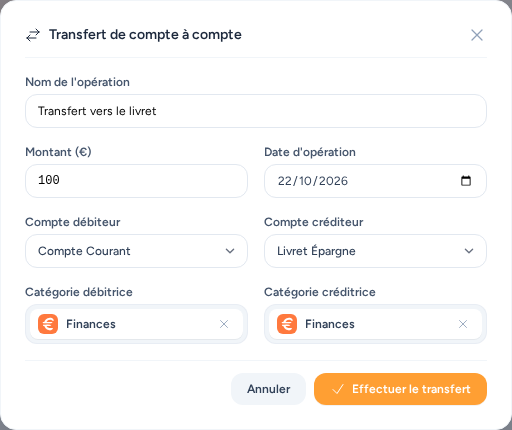
The form asks for a name, an amount, an operation date, a debited account and a credited account (two different accounts), plus an optional category for each side of the transfer.
Amount is always positive
The amount is always entered as positive: the application itself creates the negative operation on the debited account and the positive operation on the credited account, with the same name and date on both sides.
Both created operations are of type Transfer, and are not reconciled by default.
Only accessible accounts
A transfer is only possible between two accounts you have access to (your own, or those shared with you) — never to someone else's account.