
Scanning a receipt
Instead of typing the amount, date and merchant of a purchase by hand, take a photo of the receipt: the application reads the text and pre-fills the operation form. Reading happens entirely on your server (Tesseract character recognition): the photo is never sent to any outside service.
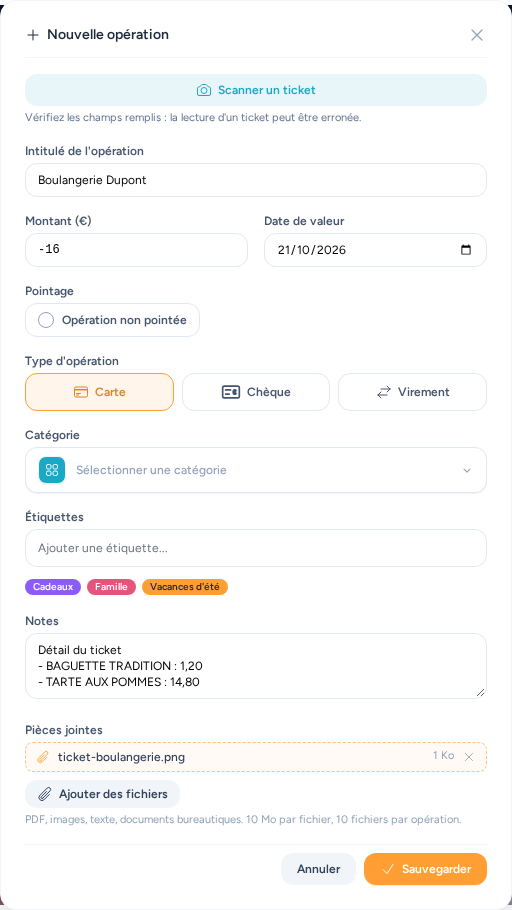
How to use it
- On an account page, open the form for a new operation (or edit one) and click Scan a receipt.
- Pick a photo. On a phone, the picker offers the camera or the gallery; on a computer, an image file (JPG, PNG or WebP, up to 10 MB).
- After a few seconds the form is filled in. Check it: reading a receipt can go wrong (a digit, a word). Nothing is saved until you click Save.
What gets filled in
| Field | Content |
|---|---|
| Title | the merchant name, as printed at the top of the receipt |
| Amount | the total to pay, as an expense (negative) |
| Dates | the receipt date, as value date (and as operation date if the account uses it) |
| Category | the one you already picked for this merchant, if any — and only if the field was empty |
| Notes | the item details, one line per item; appended after your existing notes if there were any |
| Attachments | the photo of the receipt |
Anything that could not be read is left as it was.
For a better result
- Photograph the whole receipt, flat, in a well-lit place, without glare or cast shadows.
- A faded or crumpled thermal receipt reads badly: if the result is wrong, retake the photo rather than fixing many fields.
- Reading understands French and English receipts: the words "Total", "Amount due", "Subtotal" or "Total", "TTC", "À payer", amounts such as
$12.50,£12.50or12,50 €, dates such as21/10/2026,October 21, 2026or21 octobre 2026. An ambiguous numeric date (03/04/2026) is read day first; the US order is only used when it is the only possible reading (10/21/2026). Check it otherwise.
No button?
The button only appears when the reading engine is installed on the server. It is in the Docker image and in the Home Assistant app. In a development environment, install it (the tesseract-ocr package with the fra language data).